
A Rapid Fix is not a discovery process. It is a contained engagement that resolves one specific digital, system, or workflow problem—usually inside two to three weeks. Here is what that actually looks like, start to finish.
The situation
A 12-person home services company had a booking system, a CRM, and a QuickBooks account that did not talk to each other. Every new customer was entered by hand in three places. Jobs occasionally fell through the gap between "booked" and "invoiced," and no one could say, without an afternoon of spreadsheet stitching, how many jobs were open at any given time.
The business did not need a new platform. It had already bought enough platforms.

What we found
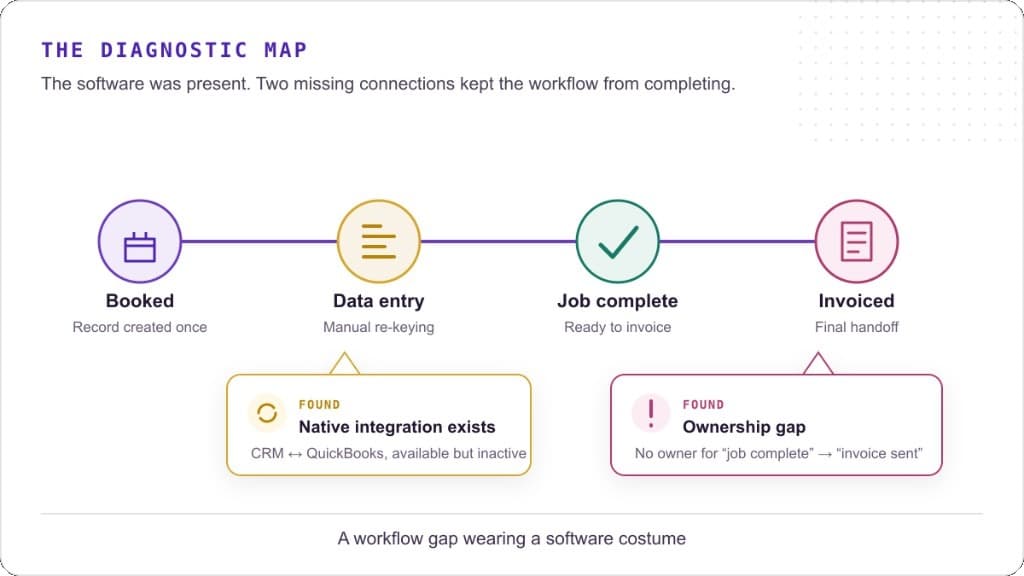
A Technology Clarity Session had surfaced the real question first: was this a software gap, or a workflow gap wearing a software costume? Two days of process mapping answered it.
- Booking data was captured correctly once, then retyped—not synced—into the CRM
- The CRM and QuickBooks had a native integration that had never been turned on
- No one owned the handoff between "job booked" and "invoice sent"
- The team had considered replacing the CRM entirely, which would have solved nothing
The fix
Scope stayed deliberately narrow—one workflow, not a system overhaul:
- Activated and configured the existing CRM–QuickBooks integration
- Rebuilt the booking-to-CRM handoff as a single automated step instead of a manual re-entry
- Assigned clear ownership for the booked-to-invoiced handoff, with a status field both teams could see
- Left the booking system and CRM in place—neither needed to be replaced

The result
- About 8 hours per week of manual data entry eliminated
- Invoicing lag dropped from several days to same-day or next-day
- Zero new software purchased
- Total engagement: two weeks, fixed fee inside the Rapid Fix range
Outcome figures are anonymized and illustrative, based on typical results from comparable Rapid Fix engagements. Individual results vary by workflow volume, team size, and starting conditions—and are not a guarantee of specific savings or timelines.

The takeaway
The instinct in a moment like this is almost always to buy something new. The CRM feels broken, so the answer feels like a better CRM. But the tools were rarely the problem. The missing piece was usually a defined handoff, an unused integration, or a single point of ownership.
That is the difference a Rapid Fix is built for: not a new platform, but the smallest complete intervention that makes the systems you already have work the way they were supposed to.
If your business has one workflow like this—technically "working," but quietly costing hours every week—a Technology Clarity Session is the fastest way to find out whether it needs a Rapid Fix, a longer Business Systems Sprint, or nothing at all.